
The portal can generate custom call queue reports. These reports provide a graphical overview of Contact Centre statistics over a given period of time. They can cover the entire Contact Centre, queues, or individual agents. This granularity enables Contact Centre Supervisors to monitor their call center.
There are 5 types of Contact Centre Reports: Queue Stats, Agent Stats, Agent Availability, Dialed Number Stats, & Abandoned. This article covers each of these reports in detail as well as the common features.
Configure a Report
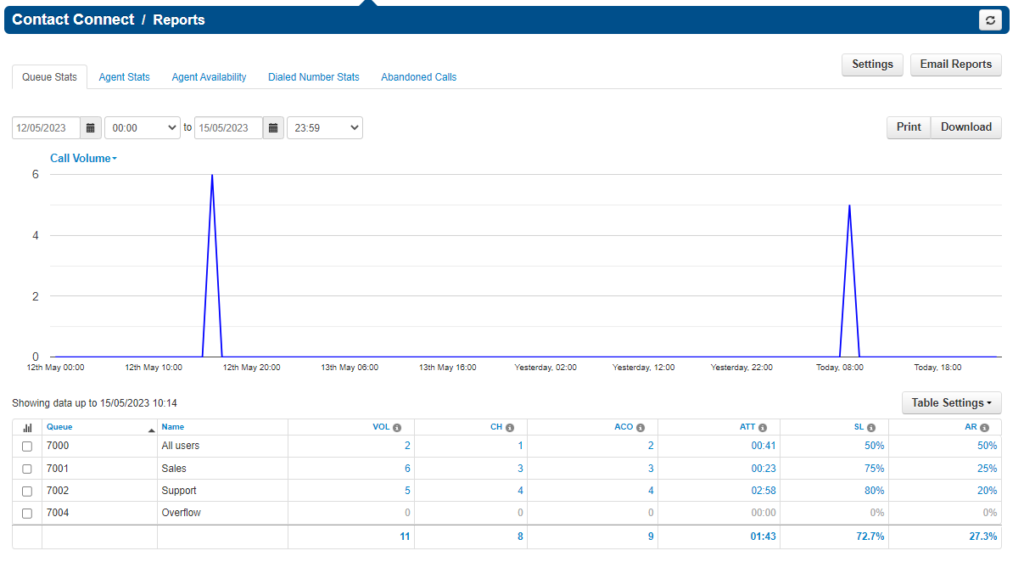
On the left-hand side of the screen are the five types of Contact Centre reports: Queue Stats, Agent Stats, Agent Availability, Dialed Number Stats, & Abandoned.

Below this is the reporting time period. Use the calendar tool to select a date and the dropdown to select a time period. The report’s output is based on the data between these two selected dates and times. The reporting data will begin at the first date and time TO (through) the second date/time.
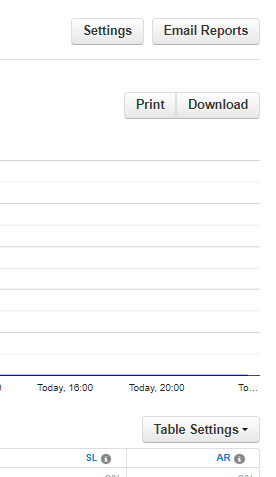
Email Reports opens a tool to send a particular type of report on a configured schedule. Select one or more. The types of reports are Summary (which is a summary of the following reports in this list), Call Queue, Agent, and Dialed Number. See below for more information about the advanced options and email report values.
Print opens a print dialog box and will print the report that is currently on screen. Utilize the “print to PDF” feature available in most print dialogs to save the report as a file instead of printing to paper.
Download will regenerate the data and then download the report that is displayed on the screen. The downloaded file will be named according to the type of report selected and the reporting time period.
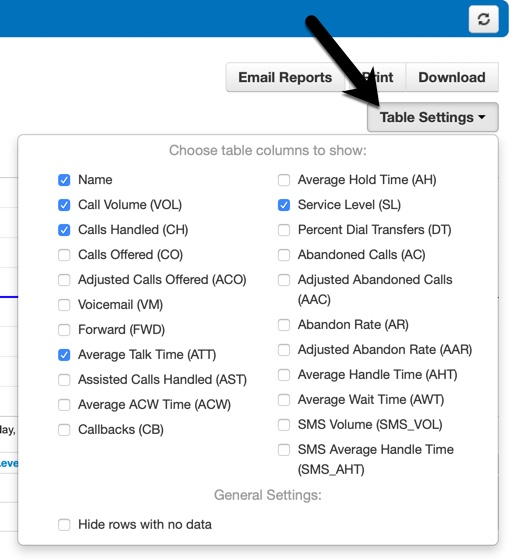
Table Settings are the fields that can be displayed or hidden in the report that is currently on screen. These fields vary based on the type of report. See a specific type of report below for more details on the available table settings.
Email a Report
Contact Centre Reports can be configured to send to users.
Navigate to the Email Reports link on the Contact Centre page.
Email Reports opens a tool to send a particular type of report on a configured schedule. Select one or more. The types of reports are Summary (which is a summary of the following reports in this list), Call Queue, Agent, and Dialed Number.

An Advanced tab (see the full list of selections in the table below) will only display when one or more of these reports are selected. Select which stats to send in each of the selected reports.
Emails are sent to the user who is configuring the report. To send to additional people, add up to four Extra Email Addresses here in the advanced tab.
Select “attach csv data to email” when the reporting data needs to be analsed in excel or a similar program.
Frequency can be daily, weekly, and/or monthly. Selecting monthly will open the option for selecting which numerical day of the month. Weekly will open which day of the week. Daily will open which time.
For example, the Contact Centre Manager needs a report emailed to her assistant every week to monitor call flow:
The manager would set up a “Call Queue” report and set the frequency to “weekly”, every Friday at 17:00. In the advanced tab, she would select “Calls Handled”, type in her assistant’s email address, and check the box for a .csv file. Every Friday at 5PM, the manager and her assistant will receive an email with the number of calls handled that week along with the values in an attached file, starting from 5:01PM the Friday before.
Advanced Tab (continued) – Customising the Report
Here is the data that will export from each type of emailed report’s advanced selection:
| Call Volume | Number of calls originating through a Call Queue. Includes answered calls, abandoned calls, forwards (FWD and AST), and voicemail. |
| Calls Handled | Number of calls answered by agent originating through a Call Queue. |
| Calls Assisted | Number of calls answered and then forwarded to another agent. |
| Calls Offered | Number of calls that reached the queue to be dispatched to agents. Includes abandoned calls. Excludes forwards and voicemail. |
| Adjusted Calls Offered | Adjusted number of calls that reached the queue. Excludes calls abandoned in less than 10 seconds. (Calls Offered CO) – (Adjusted Abandoned Calls AAC). |
| Voicemail | Number of calls handled by the automated voicemail system. |
| Time Talking | The number of minutes spent by an agent for all calls. |
| Average Talk Time | Average number of minutes spent by agent talking per call, on calls originating through a Call Queue. Excludes hold time. |
| Average Hold Time | Average time a caller spends on hold with an agent. Excludes waiting time in the Call Queue. |
Types of Contact Centre Reports
This section provides a detailed look into the five types of Contact Centre Reports available in the portal: Queue Stats, Agent Stats, Agent Availability, Dialed Number Stats, and Abandoned.
Queue Stats
The Queue Stats report allows supervisors to view specific attributes on a queue-by-queue basis such as call volume, calls handled, abandoned calls, average wait time, and much more.
Here are the configurable attributes available within a Queue Stats report. Select or deselect them in Table Settings to show or hide. Optionally, select to “hide rows with no data”.
| Stats | Definition |
|---|---|
| Volume (VOL) | Number of calls originating through a Call Queue. Includes answered calls, abandoned calls, forwards, and voicemail. |
| Calls Handled (CH) | Number of calls answered by agent originating through a Call Queue. |
| Calls Offered (CO) | Number of calls that reached the queue to be dispatched to agents. Includes abandoned calls. Excludes forwards and voicemail. |
| Adjusted Calls Offered (ACO) | Adjusted number of calls that reached the queue. Excludes calls abandoned in less than 10 seconds. (Calls Offered CO) – (Adjusted Abandoned Calls AAC) |
| Voicemail (VM) | Number of calls handled by the automated voicemail system. |
| Forward (FWD) | Number of calls forwarded to another queue or off-net phone number for handling. Includes forwarded calls to voicemail. |
| Average Talk Time (ATT) | Average number of minutes spent by agent talking per call, on calls originating through a Call Queue. Excludes hold time. |
| Assisted Calls Handled (AST) | Number of calls answered and then forwarded to another agent. |
| Average ACW Time (ACW) | Average time an agent spends between the end of a call and submitting call disposition. |
| Callbacks (CB) | Number of calls that requested a callback rather than waiting in the queue. |
| Average Hold Time (AH) | Average time a caller spends on hold with an agent. Excludes waiting time in the Call Queue. |
| Service Level (SL) | The ratio of calls meeting the configurable service level agreement. |
| Percent Dial Transfers (DT) | Percentage of calls that landed in the queue and were offered to an agent. |
| Abandoned Calls (AC) | Number of calls that abandoned the queue before being answered by an agent. |
| Adjusted Abandoned Calls (AAC) | Adjusted number of calls that abandoned the queue. Excludes calls abandoned in less than 10 seconds. (Abandoned Calls) – (Number of calls abandoned in less than 10 seconds) |
| Abandon Rate (AR) | Percentage of calls offered that were abandoned before being offered to an agent. (Abandoned Calls AC) / (Calls Offered CO) |
| Adjusted Abandon Rate (AAR) | Percentage of calls offered that were abandoned in under 10 seconds. (Adjusted Abandoned Calls AAC) / (Adjusted Calls Offered ACO) |
| Average Handle Time (AHT) | Average time an agent spent on a call. Includes Talk Time (TT), Hold Time (AH), and Disposition Time (ACW). |
| Average Wait Time (AWS) | Average number of seconds a caller spent in the selected queue before being dispatched to an agent. If none selected, total for all queues will be displayed. |
| SMS Volume (SMS_VOL) | Number of SMS sessions handled through a Call Queue. . |
| SMS Average Handle Time (SMS_AHT) | Average time an agent spent handling an SMS session from the queue, starting from the moment they accept the message until it is terminated. |
Agent Stats
The Agent Stats report displays color-coded statistics by agent such as extension, department, talk time, missed calls, and more.

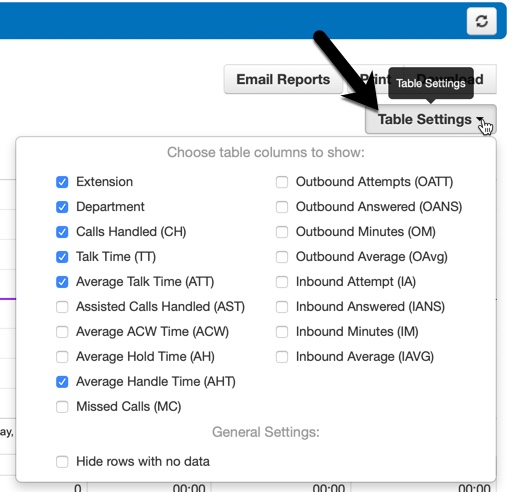
Here are the configurable attributes available within an Agent Stats report. Select or deselect them in Table Settings to show or hide. Optionally, select to “hide rows with no data”.
| Stats | Definition |
|---|---|
| Calls Handled (CH) | The number of calls answered by the agent originating through a Call Queue. |
| Talk Time (TT) | The number of minutes spent by an agent on answered calls originating through a Call Queue. |
| Average Talk Time (ATT) | Average number of minutes, per call, spent by the agent talking on calls originating through a Call Queue. Excludes hold time. |
| Assisted Calls Handled (AST) | Number of calls answered and then forwarded to another agent. |
| Average ACW Time (ACW) | Average time an agent spends between the end of a call and submitting call disposition. |
| Average Hold Time (AH) | Average time a caller spends on hold with an agent. Excludes waiting time in the Call Queue. |
| Average Handle Time (AHT) | Average time an agent spent on a call. Includes Talk Time (TT), Hold Time (AH), and Disposition Time (ACW). |
| Missed Calls (MC) | Number of calls originating through a call queue offered to an agent but not answered. This includes multiple attempts if a call loops through all agents, but excludes unanswered simultaneous ring calls. |
| Outbound Attempts (OATT) | Number of outbound call attempts by an agent. Excludes on-net calls and conference calls. |
| Outbound Answered (OANS) | Number of outbound calls by agent answered by a remote party. Includes calls answered by voicemail. Excludes on-net calls and conference calls. |
| Outbound Minutes (OM) | Number of minutes spent by an agent on outbound calls. Includes talk and hold time. Excludes call center calls, on-net calls, and conference calls. |
| Outbound Average (OAvg) | Average length of time spent by an agent on outbound calls. Excludes call center calls, on-net calls, and conference calls. |
| Inbound Answered (IANS) | Number of inbound answered calls to an agent. Includes call center calls. Excludes on-net calls and conference calls. |
| Inbound Minutes (IM) | Number of minutes spent by an agent on inbound calls. Includes contact centre calls. Includes talk and hold time. Excludes on-net calls and conference calls. |
| Inbound Average (IAVG) | Average length of time spent by an agent on inbound calls. Includes contact centre calls. Excludes on-net calls and conference calls. |
Agent Availability
The Agent Availability report displays an agent’s availability in a domain or in a department within a domain. It will display the time an agent’s status was set to online or set to lunch, etc. during the selected time period.
Managers can utilise this report to quickly see when one agent is available and another agent is not. Hover over a column header’s “i” icon to view an explanation about what is displayed in that column.

Here are the configurable attributes available within an Agent Availability report. Select or deselect them in Table Settings to show or hide. Optionally, select to “hide rows with no data”.
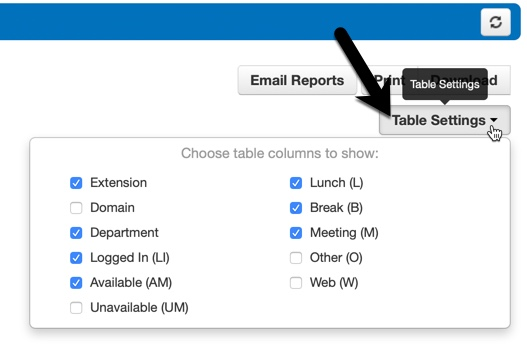
| Stats | Definition |
|---|---|
| Extension | This is the Contact Centre Agent’s extension. |
| Domain | If managing multiple domains, this shows which domain the Contact Centre Agent is in. |
| Department | If a department has been assigned, this is the Contact Centre Agent’s department. |
| Logged In (LI) | This is the total time the Contact Centre Agent’s status was set to “online”. An agent has to manually change their status from offline to online when they begin their shift. |
| Available (AM) | This is the total time the Contact Centre Agent was available for calls. This includes time logged in / online. It excludes statuses of unavailable such as break, lunch, meeting, web, and other. |
| Unavailable (UM) | This is the total time the Contact Centre Agent was not available for calls. Includes time logged off and offline statuses such as break, lunch, meeting, web, and other. Excludes online / available. |
| Lunch (L) | This is the total time the Contact Centre Agent’s status was set to “lunch”. |
| Break (B) | This is the total time the Contact Centre Agent’s status was set to “break”. |
| Meeting (M) | This is the total time the Contact Centre Agent’s status was set to “meeting”. |
| Other (O) | This is the total time the Contact Centre Agent’s status is not set to available, break, lunch, meeting, or web. Excludes unavailable status. |
| Web (W) | This is the total time the Contact Centre Agent’s status was set to “web”. |
Dialed Number Stats
The Dialed Number Stats report displays information based on the DNIS. DNIS is a telephone service that informs the receiver about a call that the caller dialed.
Uncheck and check the numbers in the Queue dropdown to graph them individually or as a group. Each number will be automatically colour-coded.
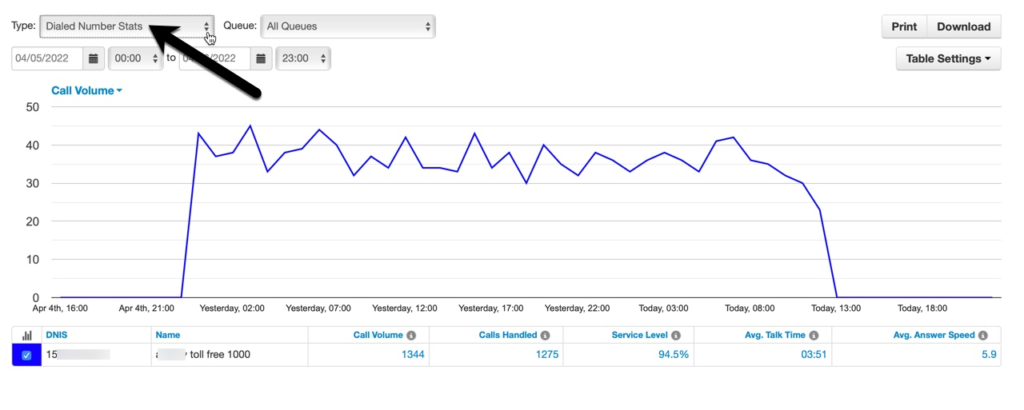
Here are the configurable attributes available within a Dialed Number Stats report. Select or deselect them in Table Settings to show or hide. Optionally, select to “hide rows with no data”.
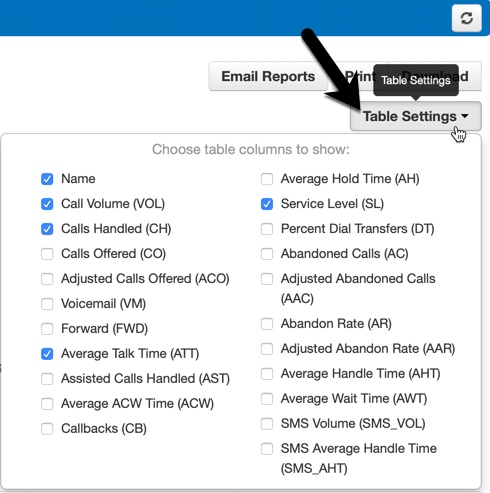
| Stats | Definition |
|---|---|
| Call Volume (VOL) | Number of calls originating through a Call Queue. Includes answered calls, abandoned calls, forwards, and voicemail. |
| Calls Handled (CH) | Number of calls answered by agent originating through a Call Queue. |
| Calls Offered (CO) | Number of calls that reached the queue to be dispatched to agents. Includes abandoned calls. Excludes forwards and voicemail. |
| Adjusted Calls Offered (ACO) | Adjusted number of calls that reached the queue. Excludes calls abandoned in less than 10 seconds. (Calls Offered CO) – (Adjusted Abandoned Calls AAC) |
| Voicemail (VM) | Number of calls handled by the automated voicemail system. |
| Forward (FWD) | Number of calls forwarded to another queue or off-net phone number for handling. Includes forwarded calls to voicemail. |
| Average Talk Time (ATT) | Average number of minutes spends per call by an agent talking on calls originating through a Call Queue. Excludes hold time. |
| Assisted Calls Handled (AST) | Number of calls answered and then forwarded to another agent. |
| Average ACW Time (ACW) | Average time an agent spends between the end of a call and submitting call disposition. |
| Callbacks (CW) | Number of calls that requested a callback rather than waiting in the queue. |
| Average Hold Time (AH) | Average time a caller spends on hold with an agent. Excludes waiting time in the Call Queue. |
| Service Level (SL) | The ratio of calls meeting the configurable service level agreement. |
| Percent Dial Transfers (DT) | Percentage of calls that landed in the queue and were offered to an agent. |
| Abandoned Calls (AC) | Number of calls that abandoned the queue before being offered to an agent. |
| Adjusted Abandoned Calls (AAC) | Adjusted number of calls that abandoned the queue. Excludes calls abandoned in less than 10 seconds. (Abandoned Calls) – (Number of calls abandoned in less than 10 seconds) |
| Abandon Rate (AR) | Percentage of calls offered that were abandoned. (Abandoned Calls AC) / (Calls Offered CO) |
| Adjusted Abandon Rate (AAR) | Percentage of calls offered that were abandoned in under 10 seconds. (Adjusted Abandoned Calls AAC) / (Adjusted Calls Offered ACO) |
| Average Handle Time (AHT) | Average time an agent spent on a call. Includes Talk Time (TT), Hold Time (AH), and Disposition Time (ACW). |
| Average Wait Time (AWT) | Average number of seconds a caller spent in the selected queue before being dispatched to an agent. If none selected, total for all queues will be displayed. |
| SMS Volume (SMS_VOL) | Number of SMS sessions originating through a Call Queue. |
| SMS Average Handle Time (SMS_AHT) | Average time an agent spent handling an SMS session, beginning from the moment the message was accepted until it was ended. |
Abandoned
The Abandoned Calls report displays contact centre graphs for abandoned calls, organised by individual queues. Time is measured along the x-axis and the number of calls abandoned is measured along the y-axis. All of the abandoned calls for the queue appear below the graph, along with statistics about each individual call.

There are no configurable attributes for this report. Table Settings is hidden while it is displayed.