
The call pickup feature can be used to answer an inbound call that is actively ringing another extension/handset, there are two types of pickup; call pickup which will answer a specific device’s call and group pickup, which will answer any call ringing at the time.
This feature is useful for answering calls from a handset that is not usually a member of an offices call grouping or for intercepting direct calls if required.
- Group Pickup
- Call Pickup
Lifting the receiver of your Yealink handset will reveal a “GPickup” key, pressing this will pickup any call actively ringing.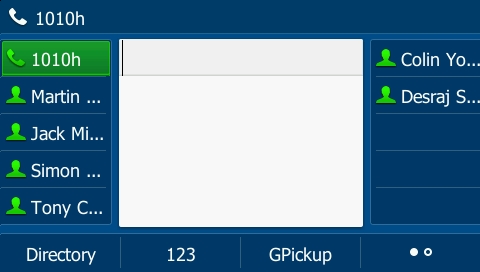 The “GPickup” key can be seen at the bottom of the screen
If the handset has no group pickup key, group pickup can also be performed by dialling the feature access code *88
A standard call pickup can be performed by pressing a flashing BLF key on your handset this indicates the extension is receiving a call, the icon will also change to an inbound call icon.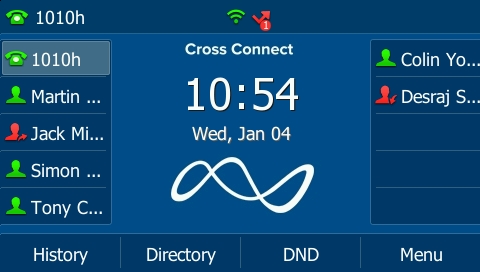 In the image above we can see that Desraj is recieving an inbound call that can be picked up
If the handset has no BLF keys and you know your colleagues extension number, the pickup can also be performed by dialling 07 followed by the extension number to pickup.
For example dialling “071000” would pick up any call ringing on extension 1000