

The Call History provides a quick reference for the most recent 50 calls. Any number listed can be called by a single click on the number displayed.
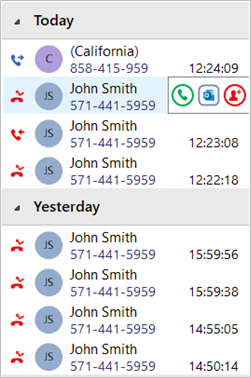

Outgoing call

Incoming call (answered)

Incoming call (missed)
Slide Out toolbar
Hovering the cursor over an entry displays the slide out toolbar which offers a variety of actions dependent on the current call status and address book information retrieved:

Call / Transfer

Show Contact (icon reflects CRM source)

Add call activity (if available)

Add Contact (if available)
Add Contact
When the call listed is not yet found in any integrated address book (or is found in some but not all integrated address books) the Add Contact icon is displayed and offers a quick method to insert the contact details into multiple locations.
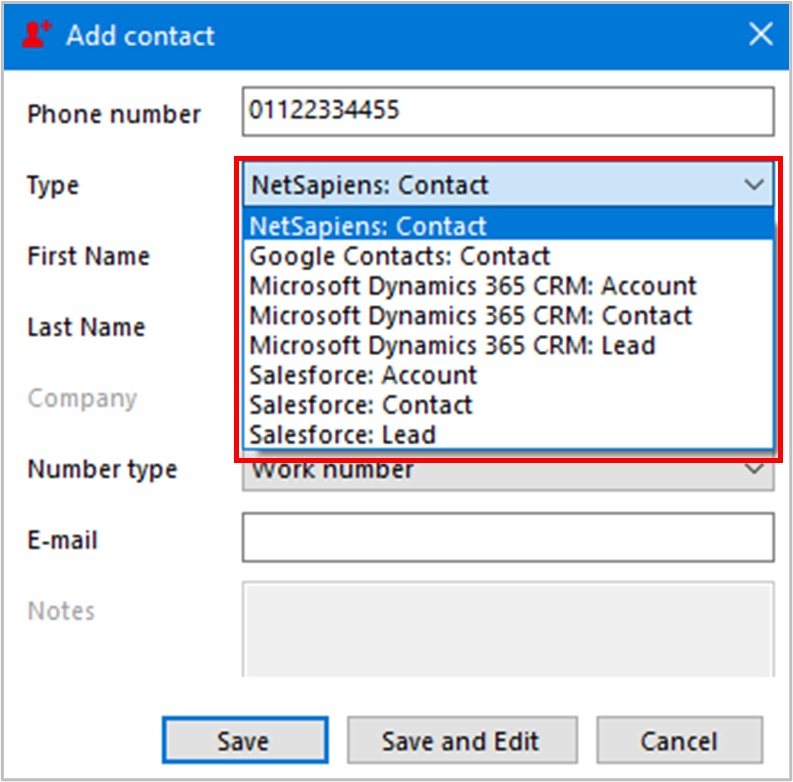
Select which integrated address book “Type” to add the contact into and either “Save” or “Save and Edit” to also open the contact within the selected address book. The stored details are then used to add to the next selected address book “Type” to quickly duplicate the contact record into multiple locations.