

If enabled in the Cross Connect user profile, Call Centre features are visible and can be controlled from the Tray Menu, AppBar or Call Toolbar.
Feature visibility
Toolbar features availability is dependant upon:
1. The Integrator user license type assigned
2. The Cross Connect Contact Centre services assigned to the user: Call Centre Agent user scope and at least one device included in one or more Call Queue.
Tray Menu / AppBar Call Centre settings
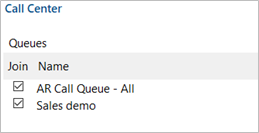
The Tray Menu and AppBar call centre toolbar displays which queue(s) the user is assigned to (indicated by the check box).
Tick/untick to enable/disable queue membership:
NOTE: Integrator will enable or disable all of the user’s devices that are configured within the selected queue.
Call Toolbar Call Centre settings
Queue Membership
The Call Toolbar displays which queue(s) the user is assigned to (indicated by the check box).
Tick/untick to enable/disable queue membership:

NOTE: Integrator will enable or disable all of the user’s devices that are configured within the selected queue.